DelFast Download (Latest 2026) - FileCR
Free download DelFast 1.3 Latest full version - Instantly delete files and folders without the delays.
Free download DelFast 1.3 Latest full version - Instantly delete files and folders without the delays.
Free Download Yali DelFast for Windows PC. It is a lightweight utility that removes files and folders instantly without waiting for slow system calculations or visual effects.
This utility is built for users who want speed and simplicity when cleaning their system. It skips the usual background checks, progress bars, and animations that often slow down file removal. Instead, it focuses on doing one thing very well: deleting selected data immediately. The compact design and no-install approach make it ideal for daily use on any Windows machine.
Speed is the core idea behind this tool. When you select items and confirm deletion, the items are removed immediately. Size calculations or previews do not pause. Think of it as flipping a light switch rather than waiting for a dimmer to brighten the room gradually.
Handling multiple files or folders at once is easy. You can select various items and remove them in a single action. This saves time during cleanup sessions and keeps your workflow smooth, especially when dealing with cluttered directories.
The software runs as a single executable file. There is no setup wizard, no registry changes, and no background services. You can store it on a USB drive or any folder and run it whenever needed. This portability makes it feel like a handy tool you keep in your pocket.
With a file size of approximately 188 KB, it barely uses any storage space. It also uses minimal CPU resources, so it runs quietly in the background without slowing your system. Even older PCs can run it comfortably.
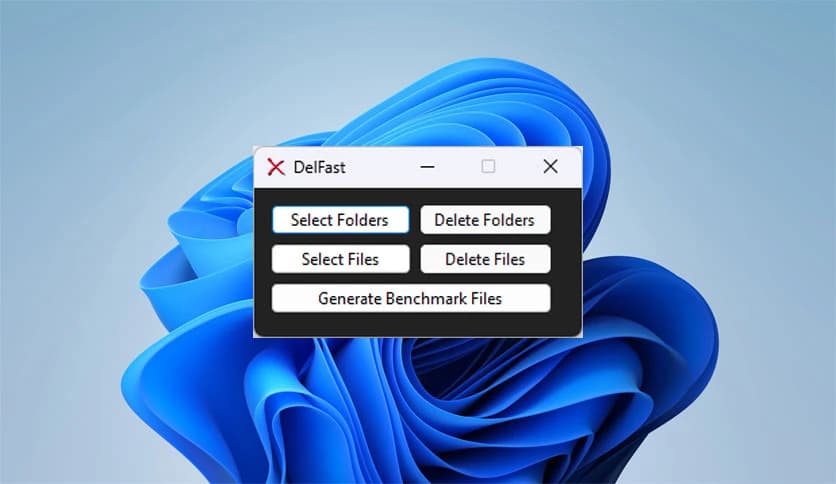
The interface is straightforward and free from distractions. Buttons and options are clearly placed, so there is no learning curve. Everything is laid out logically, making it easy for beginners while remaining efficient for experienced users.
Items removed using this tool do not go to the Recycle Bin. Once deleted, they are permanently deleted. This is useful when you need to free up space instantly or remove sensitive data without leaving traces.
This utility is perfect for quick cleanups, managing temporary folders, or removing large batches of unwanted files. It feels like using a fast broom instead of a slow vacuum, letting you tidy up without interruptions.
DelFast is a wise choice for anyone who values speed, simplicity, and control when deleting files. It eliminates unnecessary delays, keeps system usage low, and delivers a clean, refreshingly direct experience.

Leave a comment
Your email address will not be published. Required fields are marked *