WinTweaks Download (Latest 2026) - FileCR
Free download WinTweaks 2.1 Latest full version - A comprehensive suite of 80 Windows optimization tweaks.
Free download WinTweaks 2.1 Latest full version - A comprehensive suite of 80 Windows optimization tweaks.
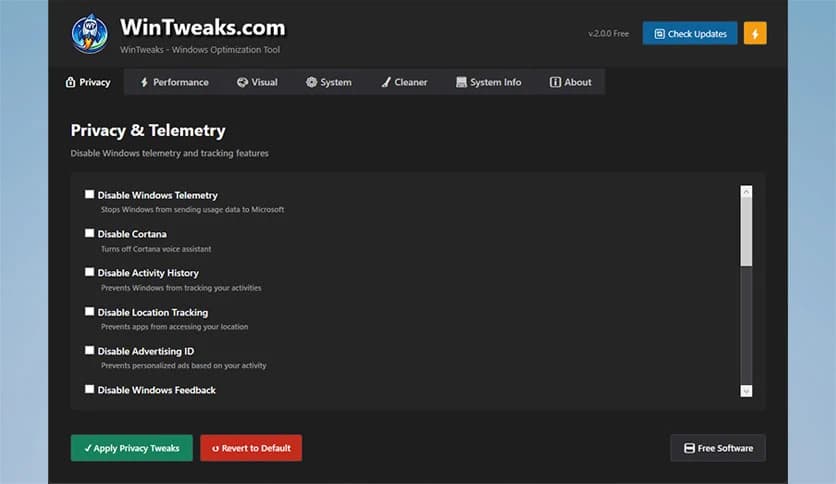
Free Download WinTweaks for Windows PC. It is a powerful Windows optimization solution that gives users deep control over performance, privacy, appearance, and system cleanup through a simple and modern interface.
It is built for people who want more from their Windows system without digging into complex settings or risky manual edits. It brings dozens of useful adjustments together in one place, making everyday optimization feel easy and safe. The clean, dark-themed design keeps everything clear, so even beginners can move around confidently.
With around 80 carefully selected tweaks, it focuses on the areas that matter most. These include system speed, privacy protection, visual customization, and storage cleanup. Instead of installing multiple utilities, this single tool acts like a well-organized toolbox for Windows.
The first thing you notice is how smooth and modern the interface feels. Everything is grouped into logical sections, so you are not overwhelmed by options. Buttons are clearly labeled, and changes can be applied with just a click.
Think of it like a control panel upgrade. Instead of hunting through hidden menus, the software places useful switches right in front of you. This saves time and reduces the risk of changing the wrong setting.
System slowdowns often come from background services and unnecessary features running silently. This tool helps you disable or fine-tune those elements to free up system resources. As a result, boot times can improve, and everyday tasks feel more responsive.
It works like clearing clutter from a busy desk. Once the extra items are removed, everything runs smoother and faster. You stay in control, choosing which adjustments fit your system and usage style.
Modern Windows versions collect a lot of data by default. The software gives you clear options to limit tracking, telemetry, and background data sharing. Each tweak is explained in simple terms, so you understand what is being changed.
This approach feels like closing unnecessary curtains in your digital house. You still enjoy all core features, but with fewer eyes looking in. Privacy settings that usually take many steps can be handled in seconds.
Personalization is another strong point. From adjusting visual effects to changing interface behaviors, you can shape Windows the way you like. Whether you prefer a minimal look or smoother animations, the options are right there.
These tweaks help your system feel more personal, almost like tailoring a suit to fit perfectly. Small visual changes can make daily use more comfortable and enjoyable.
Over time, Windows collects temporary files, logs, and leftovers from updates or apps. The built-in cleanup options help safely remove this digital junk. This can free up disk space and reduce unnecessary background activity.
Instead of manually searching folders, the software does the heavy lifting for you. It is similar to a spring cleaning session, keeping your system fresh and organized.
One major advantage is the careful selection of tweaks. Nothing feels experimental or risky. Each option is chosen for stability and usefulness, making it suitable for both daily systems and older PCs.
You stay in charge at all times. Changes can be applied step by step, and nothing is forced. This balance between power and safety makes the experience stress-free.
Beginners appreciate the simplicity and explanations, while advanced users enjoy quick access to settings that usually require manual registry edits. It bridges the gap between casual use and deeper system control.
In simple terms, it works like a friendly guide. New users get confidence, and experienced users save time without losing flexibility.
The software does not feel heavy on the system. It runs smoothly without consuming unnecessary resources. This makes it suitable even for lower-end machines or laptops that need careful resource management.
Because of its lightweight nature, it feels more like a helper than a burden. You get improvements without sacrificing stability or performance.
Using it occasionally can keep your system in good shape. Regular cleanup and small optimizations prevent issues from building up over time. This can extend the smooth life of your Windows installation.
It is similar to routine car maintenance. Small checkups and adjustments help avoid bigger problems later.
WinTweaks stands out as a practical, well-balanced Windows optimization solution that puts control back in users' hands. It combines performance tuning, privacy protection, customization, and cleanup in a single, easy-to-use package. Instead of juggling multiple tools, you get one reliable companion that keeps your system running smoothly and comfortably.
Leave a comment
Your email address will not be published. Required fields are marked *