TheBrain Download (Latest 2026) - FileCR
Free download TheBrain Latest full version - A visual information management tool.
Free download TheBrain Latest full version - A visual information management tool.
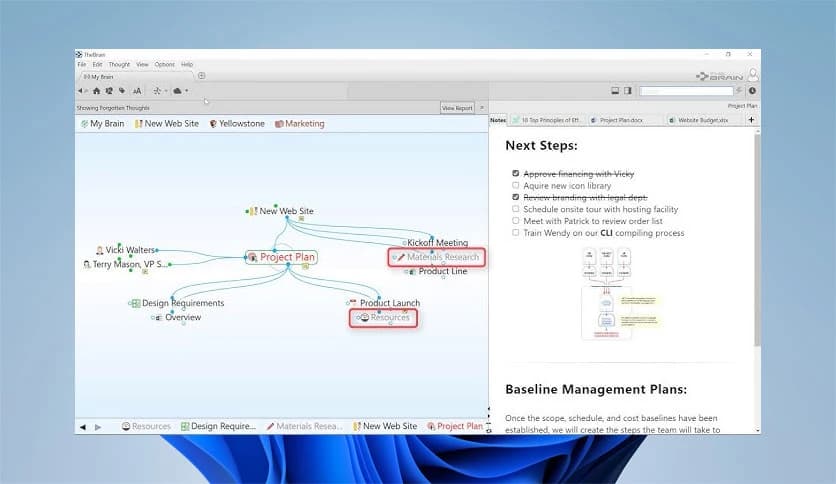
Free Download TheBrain for Windows PC. It is a powerful thinking and organization tool that uses visual mapping and agentic AI to help you connect ideas, manage information, and work faster.
It is designed to function as an extension of your mind. Instead of forcing notes into rigid folders, the software lets information live in a flexible visual map where everything is connected by meaning. With the latest agentic AI features, users can now talk to their data, automate routine tasks, and navigate large knowledge sets at impressive speed.
The redesigned unified interface feels the same across desktop, mobile, and web. Whether you are on your PC or phone, your knowledge stays organized, searchable, and instantly available through cloud syncing.
The software replaces traditional folders with a living map of thoughts. Each idea becomes a node, and relationships form naturally, much like thoughts connect in the human brain. This makes complex topics easier to understand because you can see how everything fits together at a glance.
It works like a digital whiteboard that never runs out of space. You zoom in to focus on details or zoom out to see the bigger picture, similar to switching between street view and satellite view on a map.
The new AI layer acts more like a smart assistant than a simple search tool. It can answer questions using your own data, suggest connections you may have missed, and even automate repetitive thinking tasks. This saves time and reduces mental load.
Performance improvements make interactions feel instant, delivering up to five times faster responses. It is like upgrading from a regular car to a sports engine under the hood.
Light Sync technology ensures that changes appear almost instantly across devices. You can add an idea on your phone and see it on your desktop without delay. This makes switching between work environments smooth and stress-free.
Cloud storage keeps everything safe while still allowing offline access. When the connection returns, updates merge automatically, keeping the knowledge base consistent.
The same clean layout is used on Windows, mobile, and the web. This consistency reduces the learning curve and helps users stay productive wherever they are. Once you learn it on one device, you know it everywhere.
Menus, shortcuts, and visuals are designed to stay out of the way so thinking remains the main focus.
The tool brings together web pages, PDFs, emails, and files into a single connected workspace. Instead of remembering where something is stored, you remember what it relates to. That relationship becomes the fastest path back to the information.
Everything stays searchable, turning your collection into a personal knowledge engine rather than a messy archive.
Search works across all content types, from text notes to attachments. Results appear instantly and are linked directly to their context, saving time otherwise spent opening multiple folders.
Navigation feels fluid, like moving through thoughts instead of files.
Researchers use it to connect studies and ideas. Writers rely on it to plan articles and books. Professionals manage projects, contacts, and references in one place. Even students use it as a digital study aid.
It adapts to different thinking styles, making it useful across many fields.
Users stay in control of their information. Local storage options and encrypted syncing protect sensitive data while still allowing flexible access.
This balance between security and convenience makes it suitable for both personal and professional use.
TheBrain is a modern thinking companion that turns scattered information into a clear understanding. By combining visual organization, fast performance, and intelligent automation, it helps users think better, remember more, and work with confidence.
Leave a comment
Your email address will not be published. Required fields are marked *