TalkToTextly Download (Latest 2026) - FileCR
Free download TalkToTextly Latest full version - Convert speech into clean text within seconds.
Free download TalkToTextly Latest full version - Convert speech into clean text within seconds.
Free Download TalkToTextly for Windows PC. It is an AI-powered transcription tool that converts audio into accurate, searchable text quickly and securely.
Turning audio into text used to feel like digging a tunnel with a spoon. Slow, frustrating, and full of errors. This solution changes that experience completely. It brings speed, accuracy, and simplicity together so users can convert recordings into readable text within seconds.
The software uses advanced artificial intelligence to understand speech patterns, accents, and different speaking speeds. Whether you're working with interviews, meetings, podcasts, or lectures, it handles them smoothly and efficiently. It acts like a smart assistant, listening carefully and writing everything down for you.
Another strong advantage is security. Many users worry about uploading sensitive recordings. This tool keeps data protected and processes files securely, giving users peace of mind while working on confidential projects.
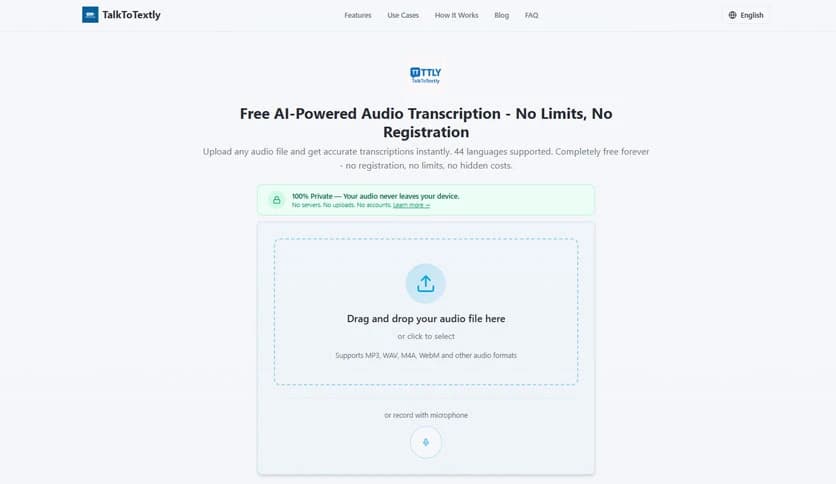
The interface is designed for simplicity. Even beginners can start using it immediately without technical knowledge. Just upload your audio file, let the software process it, and receive clean, organized text ready to use.
The heart of the tool is its intelligent transcription engine. It listens to audio carefully and converts spoken words into text with impressive accuracy. Unlike traditional tools that struggle with accents or background noise, this solution adapts and learns from different audio environments.
The system can recognize multiple voices and distinguish between speakers. This feature is especially useful for meetings, interviews, and group discussions. Instead of one long paragraph, it organizes the text in a structured format that is easier to read and edit.
Processing speed is another highlight. Files that once took hours to transcribe manually can now be completed in minutes. This makes it ideal for professionals who work with large volumes of audio content daily.
Speed matters when deadlines are tight. The software delivers quick results without sacrificing quality. It processes files efficiently while maintaining clarity and structure.
Accuracy is improved through advanced machine learning. The tool understands context, punctuation, and sentence structure. This reduces editing time and helps users focus on their work rather than correcting transcription errors.
Even long recordings are handled smoothly. The software remains stable and reliable throughout the process, making it suitable for large projects.
The interface feels clean and organized. Everything is placed where users expect it to be. Uploading files is easy, and the processing steps are clearly displayed.
Users can drag and drop audio files directly into the workspace. This saves time and makes the workflow smoother. Beginners can start working immediately without having to read complicated instructions.
The editing environment is also simple. Users can quickly review, correct, and export text without switching between multiple programs.
Compatibility is important when working with different recording devices. The software supports a wide range of audio formats, making it flexible and convenient.
Users can upload recordings from smartphones, voice recorders, or professional equipment. The tool processes them without requiring conversions or extra steps.
This flexibility makes it useful for journalists, students, podcasters, and business professionals alike.
Security is a major concern when dealing with sensitive recordings. The tool ensures that files remain protected during processing.
It uses strong encryption and secure processing methods. This protects confidential information and prevents unauthorized access.
Users can confidently upload interviews, business meetings, and personal recordings without worrying about privacy issues.
Once transcription is complete, users receive clean and searchable text. This makes it easier to locate specific words or phrases.
The editing tools allow quick adjustments. Users can refine punctuation, adjust formatting, and organize text efficiently.
Export options provide flexibility. The text can be saved in multiple formats, making it ready for documents, reports, or content creation.
This tool fits a variety of workflows. Students can convert lectures into notes. Journalists can transcribe interviews quickly. Businesses can document meetings without manual typing.
Content creators also benefit from faster podcast and video transcription. This helps improve accessibility and content organization.
The flexibility makes it useful for both individuals and teams working on different projects.
Manual transcription consumes valuable time. This solution eliminates that burden and improves productivity.
Users can focus on analysis, editing, and decision-making instead of typing. It acts as a silent assistant, handling repetitive work.
By saving time, it helps users complete projects faster and maintain efficiency.
The software runs smoothly without heavy system requirements. It is optimized for performance and stability.
Even on basic computers, it performs well and delivers consistent results. This makes it accessible to a wide range of users.
The lightweight design also ensures quick installation and easy setup.
TalkToTextly offers a fast, reliable way to convert audio to readable text. It combines AI-powered accuracy, strong security, and a user-friendly design to simplify transcription tasks. Whether working with interviews, meetings, or lectures, it helps users save time and improve productivity. The lightweight performance and flexible features make it a practical solution for anyone who needs efficient transcription.
Leave a comment
Your email address will not be published. Required fields are marked *