StoryVox Download (Latest 2026) - FileCR
Free download StoryVox 1.0.13 Latest full version - Turn Any Book Into a Professional Audiobook.
Free download StoryVox 1.0.13 Latest full version - Turn Any Book Into a Professional Audiobook.
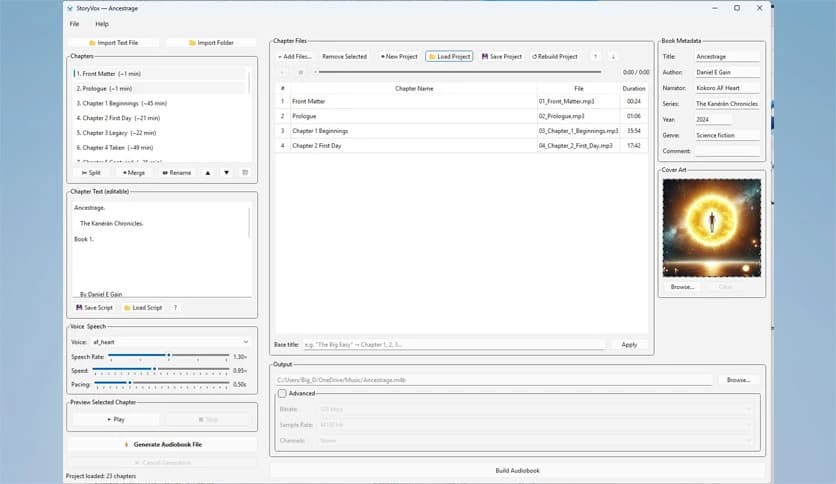
Free Download StoryVox for Windows PC. It is an AI-powered application that transforms text into audiobooks using 53 natural voices and operates locally for data privacy
Creating audiobooks used to be expensive, time-consuming, and complicated. You needed a recording studio, professional voice actors, editing tools, and countless hours of production. Now, everything happens directly on your desktop. This powerful audiobook creator transforms written content into broadcast-quality narration with just a few clicks.
The software allows authors, educators, publishers, and content creators to convert text into natural-sounding audio. Whether you're turning a novel into an audiobook, creating educational material, or producing voice content for distribution, the tool simplifies the entire process. It removes technical barriers and replaces them with a smooth and intuitive workflow.
Everything runs locally on your PC, ensuring complete privacy and zero subscription fees. You can generate unlimited audiobooks, experiment with voices, and fine-tune narration without worrying about cloud limits or recurring payments.
One of the biggest strengths is its collection of 53 natural AI voices. These voices cover a wide range of accents, including American, British, European, and Asian tones. This gives users the flexibility to match the narration style to the content type.
Each voice is powered by Kokoro TTS, known for delivering realistic speech patterns, natural pauses, and expressive delivery. Instead of robotic narration, the voices sound conversational and engaging. This makes audiobooks more enjoyable and professional.
You can choose male or female voices depending on the tone you want. Whether you're narrating fiction, technical content, or educational material, there is always a voice that fits perfectly.
Privacy and independence are key advantages. Everything runs directly on your computer without requiring internet access. This means your manuscript stays private and secure.
Many online services charge per word or require subscriptions. Here, there are no monthly fees or usage limits. You can create unlimited audiobooks at no additional cost.
Offline functionality also improves speed and reliability. There is no waiting for cloud processing or worrying about slow connections. Everything works instantly from your desktop.
Importing your manuscript is simple and intelligent. When you load a text file, the tool automatically detects chapters, structure, and front matter. This saves hours of manual formatting.
You can split, merge, or rename chapters with a single click. The system automatically organizes your content, making audiobook production feel effortless.
This smart detection works well for novels, guides, and long documents. It transforms raw text into a structured audiobook project within seconds.
Customization plays a major role in achieving professional results. You can adjust speech rate, pacing, and delivery to match your preferences.
Preview any chapter in real-time before generating the full audiobook. This helps you fine-tune narration and avoid mistakes. The instant preview feature speeds up and improves editing efficiency.
You can slow down the narration for educational content or speed it up for storytelling. These controls provide flexibility similar to working with real voice actors.
Once narration is complete, exporting is quick and straightforward. You can choose between WAV for high-quality audio or MP3 for smaller file sizes.
Each chapter is assembled automatically, ensuring seamless playback. Sentence-level processing guarantees smooth transitions and natural pacing.
This allows users to publish directly to platforms like Audible and ACX, or to distribute audiobooks independently. The export system simplifies the final production stage.
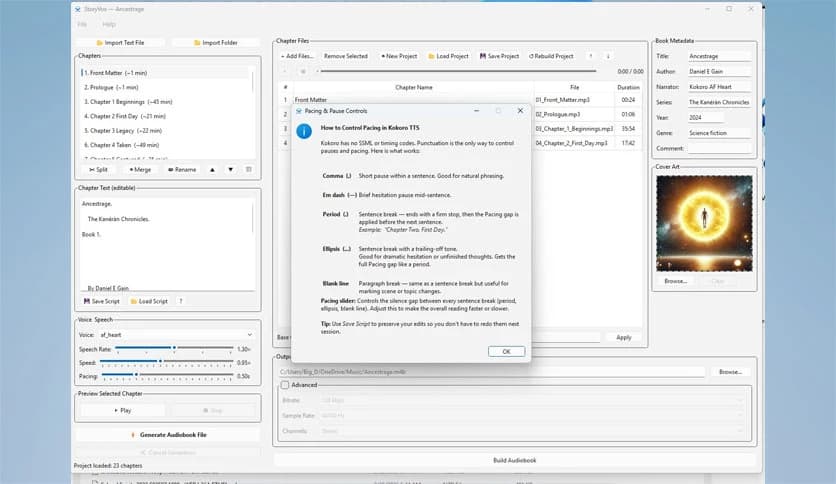
Editing directly inside the app makes the workflow smoother. You can adjust punctuation to control pauses and pacing.
Changes can be previewed instantly before generating audio. This reduces errors and improves efficiency.
You can also save and reload scripts, allowing you to continue projects at any time. This flexibility makes the tool suitable for both small and large audiobook projects.
The process is designed to be simple and efficient:
The software is suitable for authors who want to convert books into audiobooks. It also helps educators create learning materials and businesses produce voice content.
Content creators can use it for podcasts, tutorials, and storytelling. The flexibility makes it useful for professionals and beginners alike.
Whether you're working on a short story or a full novel, the tool adapts effortlessly to your needs.
Processing is quick and efficient thanks to local generation. You don't need to wait for servers or uploads.
This improves productivity and allows you to create multiple audiobooks quickly. The result is consistent and high-quality narration every time.
StoryVox makes audiobook creation simple, affordable, and professional. It removes the need for studios, voice actors, and complicated editing tools. With natural AI voices, offline functionality, and flexible controls, users can produce broadcast-quality audiobooks quickly. Whether you're an author, educator, or content creator, this solution effortlessly transforms text into engaging audio.
Leave a comment
Your email address will not be published. Required fields are marked *