SpotiFLAC Download (Latest 2026) - FileCR
Free download SpotiFLAC 7.1.0 Latest full version - Get Spotify tracks in Hi-Res lossless FLACs.
Free download SpotiFLAC 7.1.0 Latest full version - Get Spotify tracks in Hi-Res lossless FLACs.
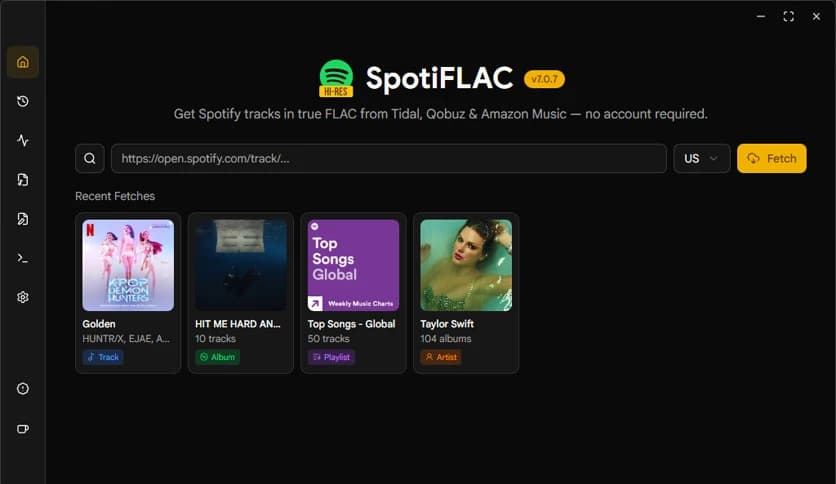
Free Download SpotiFLAC for Windows PC. It is an open-source tool that lets you download Spotify tracks, albums, and playlists in true high-quality FLAC format using lossless sources.
It is a Go-based, open-source solution built for music lovers who want better sound quality without complicated steps. It matches Spotify tracks with lossless audio from platforms like Tidal, Qobuz, Amazon Music, and Deezer. The best part? You do not need an account on those services to use them.
Think of it as a bridge between convenience and quality. Spotify makes discovering music easy, but its streaming format is compressed. This tool steps in and replaces that compressed stream with true FLAC audio from trusted lossless sources. It feels like upgrading from standard definition to Ultra HD, but for your ears.
The software focuses on one thing: real, lossless sound. Instead of downloading compressed audio, it finds high-quality FLAC versions that match your selected tracks. FLAC files keep every detail of the original recording, so you hear the music the way the artist intended.
If you use good headphones or studio monitors, the difference becomes clear. The bass feels deeper. The vocals sound cleaner. The overall experience becomes richer and more immersive.
This tool gives you flexibility. You can download single tracks if you only want a specific song. You can grab full albums for uninterrupted listening. Or you can save entire playlists with just a few steps.
It keeps things simple and organized. Your downloaded files are neatly stored, making it easy to manage your offline music library. It feels like building your own personal collection, one high-quality track at a time.
One of the most convenient features is that you do not need an account for Tidal, Qobuz, Amazon Music, or Deezer. The tool handles the matching process automatically in the background.
This removes the usual barriers that come with multiple subscriptions. You focus on the music, not on signing up or managing different services. It saves time and keeps the process smooth.
Being open-source means the code is available for everyone to inspect. That builds trust. Developers can review, improve, and adapt it. You are not locked into a closed system.
Open-source software often grows stronger over time because a community supports it. Updates, improvements, and fixes come from real users who care about performance and reliability.
The software is written in Go, a language known for speed and efficiency. That means downloads are fast and stable. Even when handling large playlists, it runs smoothly.
Performance matters when you are working with high-quality audio files. FLAC files are larger than compressed formats, so you need a tool that handles data efficiently. This one does exactly that.
You do not need to be a tech expert to use it. The interface and workflow are designed to be clear and straightforward. You provide the Spotify track, album, or playlist link, and the tool takes care of the rest.
It feels like ordering food online. You choose what you want, confirm, and wait while it prepares everything behind the scenes. No confusion. No clutter.
The matching system is smart. It looks for the closest possible lossless version of your selected track from supported platforms. This ensures that the downloaded FLAC file reflects the correct song, album, and artist details.
Metadata such as track name and album information is preserved, so your music player displays everything properly. Your library stays clean and professional.
If you care about sound quality, this tool feels like a hidden gem. Compressed audio removes subtle details to reduce file size. FLAC keeps everything intact.
Imagine watching a movie with blurry visuals versus crisp 4K resolution. The story is the same, but the experience is different. That is what lossless audio brings to your music sessions.
Once downloaded, your tracks are stored locally on your PC. You do not depend on internet speed or streaming limits. Your music is always ready.
This is especially useful during travel or in areas with unstable connections. You build your own high-quality offline library without restrictions.
SpotiFLAC is a powerful and practical solution for anyone who wants true FLAC audio from Spotify-matched tracks without having to manage multiple accounts. It combines open-source transparency, strong performance, and high-fidelity output into one simple package. If you value sound quality and offline freedom, this tool gives you both without unnecessary complexity.
Leave a comment
Your email address will not be published. Required fields are marked *