Cubox Download (Latest 2026) - FileCR
Free download Cubox Latest full version - Smart tool to collect, read, and organize knowledge.
Free download Cubox Latest full version - Smart tool to collect, read, and organize knowledge.



Free Download Odd Lab Cubox for Windows PC. It is a smart reading and research tool that helps you collect, organize, and understand information simply.
Managing online content can feel like trying to hold water in your hands. Articles, blogs, and notes keep slipping away. This is where the software steps in and makes everything easier. It works like a digital brain, storing your ideas, readings, and discoveries in one place.
The tool is built for people who love reading, learning, and researching but often struggle to keep track of everything. Whether you're saving web articles or organizing research material, it simplifies the entire process. You don’t need any technical knowledge to get started, which makes it accessible to everyone.
One of the best things about the tool is how easily it collects content. You can save articles, blogs, and web pages with just a few clicks. It feels like bookmarking, but much smarter. Instead of cluttering your browser, everything is stored neatly in one organized space.
Think of it as your personal digital library. Every time you come across useful information online, you can instantly store it for later reading. No more losing valuable content or searching endlessly through history tabs.
Reading online can sometimes feel messy, especially with ads and distractions everywhere. The software removes all that noise, giving you a clean reading environment. It allows you to focus only on the content that matters.
It also lets you categorize your saved materials. You can group similar topics together, making it easier to revisit them later. It’s like arranging books on a shelf, but much faster and smarter.
The tool includes a powerful AI system designed specifically for reading and research. It helps you understand complex information more easily. Instead of reading the same paragraph multiple times, the AI helps break it down into simple insights.
This feature feels like having a study partner who explains things clearly. It can help summarize content, highlight key points, and even help you recall important details when needed.
While reading, you can highlight important sections and add your own notes. This makes learning more interactive and engaging. Instead of passively reading, you actively connect with the content.
It works like writing in the margins of a book, but without damaging anything. Your notes stay organized and can be revisited anytime. This is especially helpful for students, researchers, and anyone who wants to retain information better.
Saving content is only half the job. Reviewing it later is what truly builds knowledge. The software helps you revisit your saved materials in a structured way. It reminds you of what you’ve learned and keeps your knowledge fresh.
Imagine planting seeds of information and regularly watering them. That’s exactly how this feature works. It ensures your learning doesn’t fade away over time.
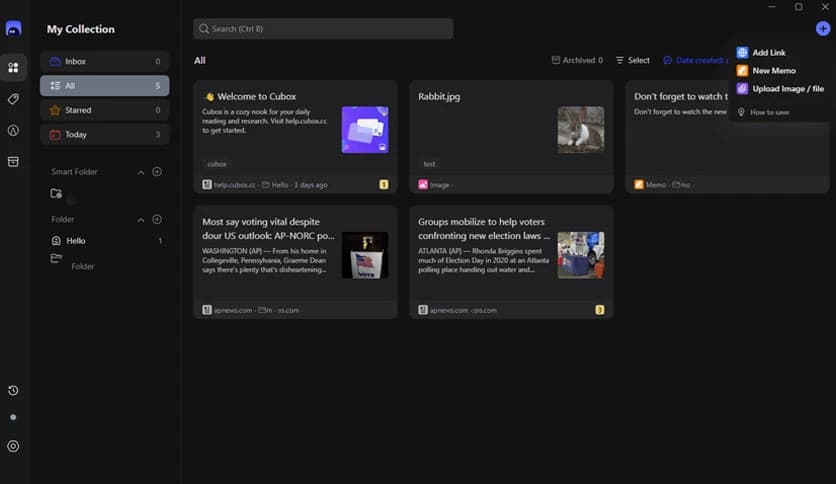
The tool offers multiple ways to organize your content. You can create collections, tag items, and sort them based on your preferences. This makes finding anything later incredibly easy.
Instead of digging through endless files, everything is just a search away. It saves time and reduces frustration, especially when dealing with large amounts of information.
Sometimes, knowledge is more powerful when shared. The software allows you to share your collections and notes with others. Whether you're working on a project or helping a friend, collaboration becomes effortless.
This feature makes it perfect for teams, students, and researchers who need to exchange ideas quickly and efficiently.
The design is simple and clean, which makes navigation easy. You won’t feel overwhelmed even if you’re using it for the first time. Everything is placed where you expect it to be.
It’s like walking into a well-organized room where everything has its place. You can focus on your work without getting lost in complicated menus.
Many tools offer saving and reading features, but few combine everything so smoothly. The software stands out because it combines collection, reading, note-taking, and AI assistance into a single platform.
It feels like having multiple tools working together seamlessly. Instead of switching between apps, you can do everything in one place.
Cubox is a complete solution for anyone who wants to collect, read, and organize information without stress. It transforms scattered online content into a well-structured knowledge system. With its smart features, clean interface, and AI support, it turns everyday reading into a powerful learning experience. Whether you are studying, researching, or simply exploring ideas, it helps you stay organized and focused.
Leave a comment
Your email address will not be published. Required fields are marked *