Boris FX VEGAS Pro Download (Latest 2026) - FileCR
Free download Boris FX Vegas Pro v2026.0.0.105 Latest full version - Fast editing tool with smooth performance power.
Free download Boris FX Vegas Pro v2026.0.0.105 Latest full version - Fast editing tool with smooth performance power.


Free Download Boris FX VEGAS Pro (Formerly MAGIX VEGAS Pro) for Windows PC. It is a powerful video editing solution designed to deliver fast performance and creative control for modern content creators.
It is built for editors who want speed, flexibility, and precision in one place. Unlike traditional editors, the software focuses on a smooth workflow that keeps you in the creative zone. Whether you are editing simple clips or complex cinematic projects, it provides a clean timeline and responsive tools that make everything feel effortless.
One of the biggest strengths of the tool is how easy it feels right from the start. You don’t need hours to understand its layout. Everything is placed where you expect it to be. Just drag, drop, and edit. It’s like driving a car with an automatic transmission—smooth and beginner-friendly, yet powerful enough for advanced users.
The software combines multiple editing features into one platform. You can cut, trim, add effects, and adjust audio without switching between tools. This saves time and keeps your workflow uninterrupted. It feels like having a full studio packed into a single application.
It supports third-party plugins and hardware, allowing you to expand its capabilities. This means you can integrate professional effects, transitions, and tools based on your needs. Think of it like adding new apps to your phone—you can customize it exactly how you want.
The core engine is the heart of the software, making everything run fast and smoothly. It ensures that even heavy projects with high-resolution footage don’t slow you down. You get stable performance, accurate colors, and smooth editing, even under pressure.
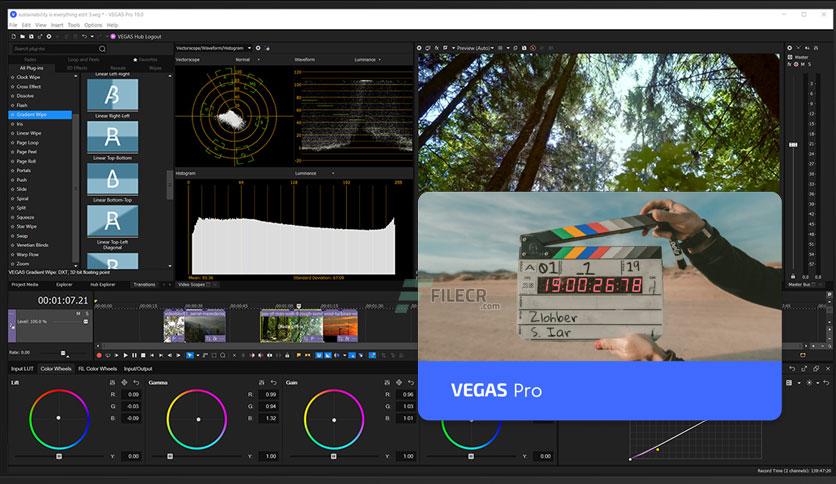
Color grading becomes simple and fast with built-in tools. You can adjust brightness, contrast, and tones directly without needing extra software. The best part is that what you see during editing matches the final output, giving you full confidence in your work.
Previewing your project is just as important as editing it. The tool offers smooth playback even when working with heavy effects or high-resolution videos. This helps you review your work without interruptions, making the editing process more efficient.
The interface is designed to keep distractions away. It provides a sleek and organized workspace that helps you focus on creativity. Everything feels neat and accessible, like a well-organized desk where every tool is within reach.
Instead of switching between different modes, you can handle color correction directly on the timeline. This keeps your workflow fast and uninterrupted. It’s like editing and painting at the same time without changing your tools.
Managing files is simple with the built-in explorer. You can access all your media from one place, saving time and avoiding confusion. It works like a central hub where all your files are neatly organized and ready to use.
Exporting your final video is straightforward and quick. The software provides a simple rendering interface with powerful options. Whether you are a beginner or a professional, you can easily choose the right settings for your project.
Boris FX VEGAS Pro stands out as a fast, reliable, and user-friendly video editing solution. It combines powerful tools, smooth performance, and a clean interface to help creators bring their ideas to life. Whether you are just starting or already experienced, it provides everything you need to edit videos with confidence and creativity.
Leave a comment
Your email address will not be published. Required fields are marked *