Loom Desktop Download (Latest 2026) - FileCR
Free download Loom Desktop 0.334.3 Latest full version - Record and share AI-powered video messages.
Free download Loom Desktop 0.334.3 Latest full version - Record and share AI-powered video messages.
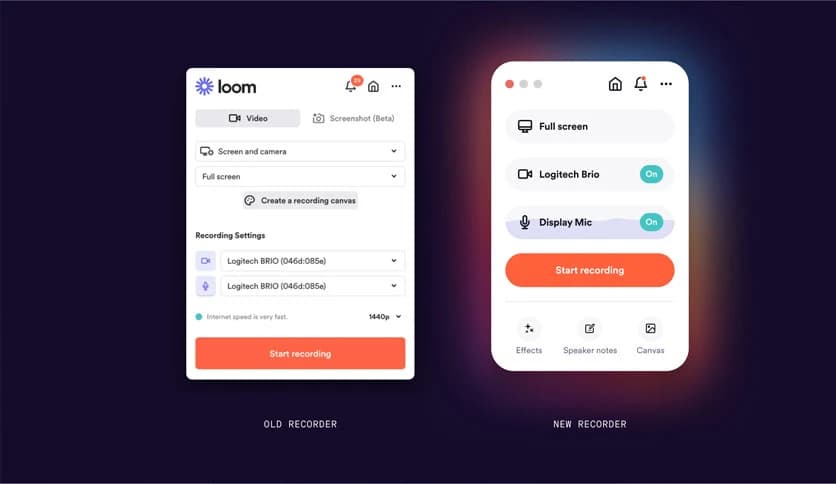
Free Download Loom Desktop for Windows PC. It is a simple and powerful way to record high-quality screen and camera videos without extra setup.
It is designed for people who want to explain things clearly without long emails or endless meetings. It helps users capture their screen, camera, and voice in a seamless, natural workflow. Instead of typing paragraphs or scheduling calls, you can just hit record and share your message in minutes.
The desktop version goes far beyond basic browser tools. It supports up to 4K recording, ensuring sharp visuals and legible text even for detailed walkthroughs. This makes it ideal for tutorials, product demos, and internal guides where clarity is critical.
It allows you to record your entire screen, a specific window, or a custom area. You can also enable your webcam to add a personal touch, such as talking face-to-face with the viewer. This combination helps build trust and keeps explanations easy to follow.
While recording, you can draw on the screen to highlight important points. Think of it like using a marker on a whiteboard, but digitally. This feature is effective for guiding attention, explaining steps, or highlighting small details that might otherwise be missed.
The software lets you choose custom recording sizes, which is helpful when creating content for different platforms. Whether you need a wide-screen format for presentations or a compact frame for internal sharing, it adapts to your needs without additional editing.
Speaker notes are a hidden gem. You can keep short reminders visible while recording so you stay on track. It feels like having cue cards nearby, helping you speak smoothly and avoid awkward pauses.
Virtual backgrounds help maintain a professional appearance, even if your workspace is not perfect. This feature is especially useful for remote teams, making every video look polished without rearranging your room.
Capturing system sound is simple and reliable. This is useful when recording software demos, tutorials, or walkthroughs where in-app audio matters. Everything is captured in sync, so viewers hear exactly what you hear.
Getting started is straightforward. After downloading and installing, you just log in and choose how you want to record. The interface feels friendly, even for first-time users, so you spend less time learning and more time creating.
This tool shines in hybrid workplaces. Instead of scheduling meetings across time zones, team members can record updates and explanations. It saves time, reduces stress, and allows everyone to watch at their convenience.
Recording a short video often takes less time than writing a long message. It also removes confusion, since viewers can see exactly what you mean. This leads to fewer follow-up questions and smoother collaboration.
Once recorded, videos can be shared instantly. Team members can watch, rewatch, and respond when needed. It feels like leaving a clear voice note, but with visuals that make everything easier to understand.
It works well for educators, developers, marketers, support teams, and managers. Anyone who needs to explain ideas, give feedback, or show processes will find it useful. Even solo users benefit from the clarity it brings.
The design stays out of your way. Buttons are clear, settings are easy to adjust, and nothing feels overwhelming. It is like a helpful assistant that quietly does its job while you focus on your message.
Loom Desktop brings clarity to communication by turning explanations into short, visual messages. It reduces meetings, saves time, and helps ideas land clearly. For modern teams and individuals who value efficiency, It is a feels like a smart upgrade to everyday communication.
Leave a comment
Your email address will not be published. Required fields are marked *