Lite XL Download (Latest 2026) - FileCR
Free download Lite XL 2.1.8 Latest full version - A lightweight text editor written in Lua.
Free download Lite XL 2.1.8 Latest full version - A lightweight text editor written in Lua.
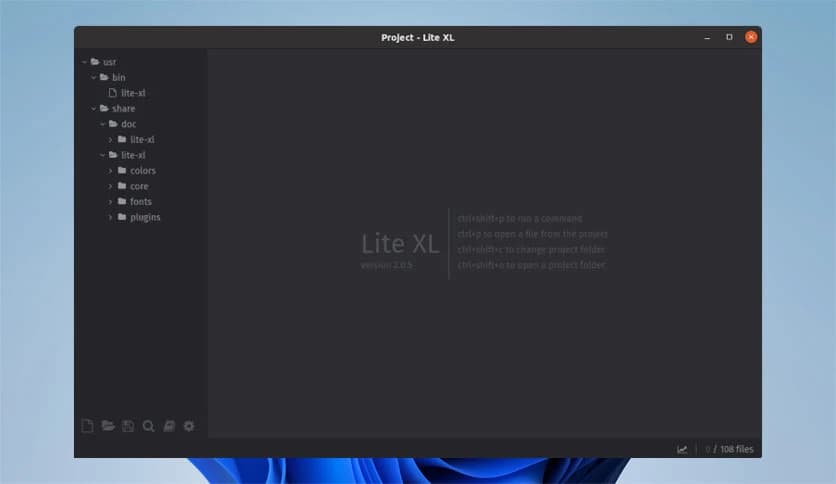


Free Download Lite XL for Windows PC. It is a fast, lightweight, and highly flexible text editor built for developers who want speed, simplicity, and complete control without unnecessary clutter.
It is designed with a clear goal: keep things simple while remaining powerful. It feels light when you open it, loads quickly, and remains responsive even on low-end systems. This balance makes it a strong choice for users who value performance without sacrificing modern editing features.
One of the software's biggest strengths is its compact size. The complete bundle is under 5MB, which is impressive in a world full of heavy applications. As a result, it runs smoothly on older machines, small devices, and even on systems with limited memory. It is like carrying a slim notebook instead of a heavy backpack.
Speed matters when you write code or edit text for hours. The tool launches almost instantly and responds quickly to every action. Scrolling, typing, and switching files are smooth, helping you stay focused. There is no waiting around, so your workflow remains uninterrupted.
Despite its small size, it includes many features you expect from a modern editor. Multiline editing lets you change several lines at once. Autocomplete helps reduce typing effort and mistakes. Pane splitting allows you to view and edit multiple files side by side, like opening pages of a book simultaneously.
This editor is made for curious minds. Its structure is open and straightforward, allowing you to explore and modify it freely. No strict rules are blocking your creativity. If you enjoy experimenting, you will feel at home. Think of it as a toolbox where every tool is easy to adjust.
Customization is where the software truly shines. Almost everything is scriptable in Lua, a language known for its ease of learning and flexibility. C is only used for system-level tasks, while Lua handles most of the logic. This setup makes it easier to personalize behavior, themes, and shortcuts.
If something is missing, there is likely a plugin available. The plugin system allows you to add or remove features at any time. From language support to new tools, you can shape the editor to match your needs. It is like building your own workspace brick by brick.
The interface minimizes distractions. There are no unnecessary buttons or flashy elements. Everything feels clean and focused, helping you concentrate on your work. The layout adapts well to different screen sizes, making it comfortable to use for long sessions.
Another significant advantage is portability. It runs on multiple platforms, including Windows. You can carry the same experience across devices without learning new tools. This consistency is like using the same pen wherever you write.
New users appreciate its simplicity, while experienced developers enjoy its flexibility. You can use it as-is or slowly customize it over time. This makes it suitable for learning, quick edits, or serious development projects.
The project is supported by an active community that contributes plugins, themes, and improvements. This shared effort keeps things fresh and evolving. It feels like joining a workshop where everyone shares ideas and tools.
Lite XL is a strong choice for anyone seeking a fast, lightweight, and customizable text editor. It shows that powerful tools do not need to be large or complex, delivering a seamless experience that adapts to both simple tasks and advanced workflows.
Leave a comment
Your email address will not be published. Required fields are marked *