KXStudio Carla Download (Latest 2026) - FileCR
Free download KXStudio Carla 2.5.10 Latest full version - A modular plugin host for creative audio workflows.
Free download KXStudio Carla 2.5.10 Latest full version - A modular plugin host for creative audio workflows.
Free Download KXStudio Carla for Windows PC. It is a powerful, flexible audio plugin host that manages, routes, and controls multiple plugins in a single clean workspace.
It is built for musicians, sound designers, and producers who want full control over their audio setup. It works like a digital hub where different audio plugins come together and interact smoothly. Instead of opening multiple tools separately, everything runs in a single, organized environment. This makes complex audio tasks feel more manageable, like arranging instruments on a mixing desk rather than juggling loose cables.
It supports a wide range of audio drivers and plugin formats, which means it fits into many workflows without friction. Whether someone is experimenting with sound design or working on a serious production, the software adapts easily to a range of needs.
The software acts as a modular host that can load and manage multiple types of audio plugins simultaneously. It allows users to freely combine effects, instruments, and processors. Think of it as a digital playground where sound blocks can be stacked, reordered, or connected in creative ways.
This flexibility is useful for both simple setups and advanced signal chains. A single plugin can run on its own, or many can work together in a carefully designed structure. The experience stays smooth even when projects grow in size.
One of its strongest points is broad plugin compatibility. It supports popular formats such as LADSPA, DSSI, LV2, VST2, VST3, and AU. In addition, it can load SF2 and SFZ sound files, which is great for working with sound fonts.
This broad support means users are not locked into a single ecosystem. Old favorites and modern plugins can live side by side, like classic instruments sharing a stage with new digital gear.
It uses JACK as the default and preferred audio driver, providing precise routing and low latency. At the same time, it does not force a single choice. Native drivers such as ALSA, DirectSound, and CoreAudio are also supported.
This makes the software usable across different systems and setups. Whether someone is running a professional studio or a home PC, audio connections remain stable and predictable.
The tool offers four different engine processing modes, each designed for a specific workflow. These modes decide how plugins are handled and how audio and MIDI data move between them.
Single-client mode is available when using the JACK driver. Here, all ports belong to one master client. This is helpful for setups that do not support multiple JACK clients, keeping everything neatly contained.
Multi-client mode also works with JACK and gives each plugin its own client. Audio and MIDI ports appear as needed, making routing very clear. This mode feels like having individual devices connected with virtual cables.
Rack mode processes plugins from top to bottom, similar to a traditional effects rack. While non-stereo channels are limited, a forced stereo option allows mono plugins to work without issues.
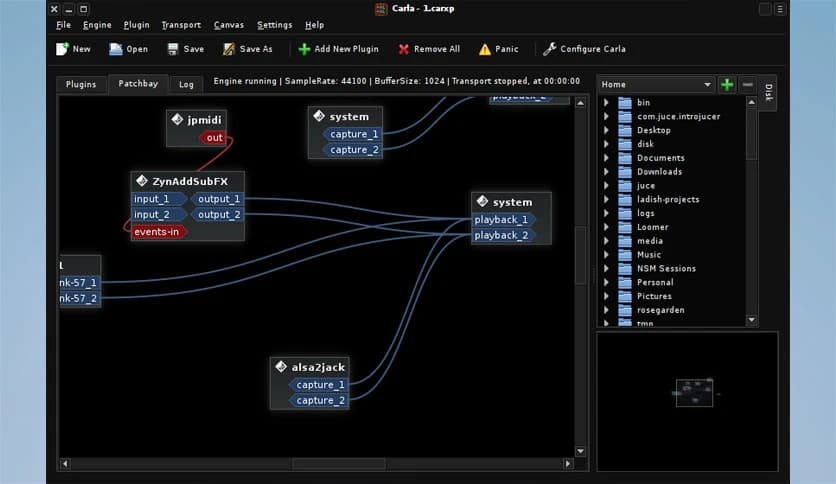
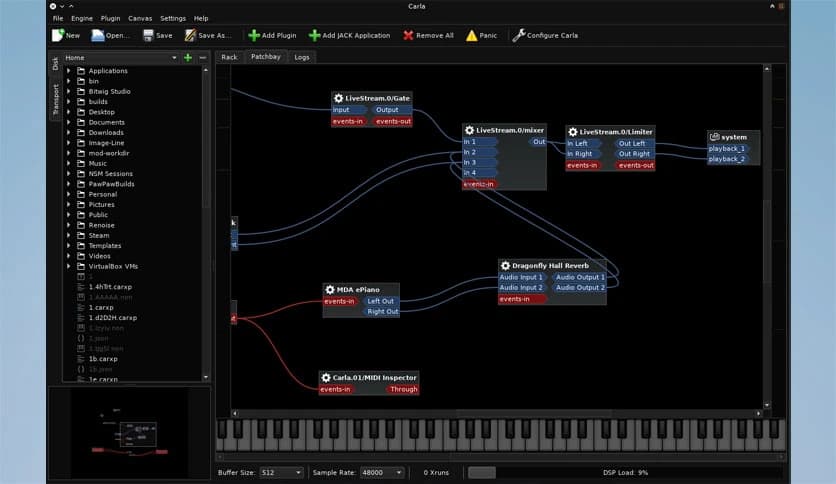
Patchbay mode brings a fully modular experience. Each plugin gets its own group and ports on a visual canvas. Audio and MIDI connections can be freely linked, offering deep control for advanced users.
The software includes built-in transport control, allowing play, stop, and tempo management directly from the interface. This keeps everything in sync during production or live use.
Automation is handled through MIDI CC, making it easy to control parameters over time. Knobs, sliders, and effects can change dynamically, adding movement and expression to sound. It feels like teaching the software to perform along with the music.
Remote control over OSC adds another layer of flexibility. Parameters can be adjusted via external devices or apps, opening the door to live performances and custom control setups.
This feature is especially useful for those who enjoy hands-on control. Tablets, controllers, or custom interfaces can interact with the system in real time.
Despite its advanced features, the interface stays approachable. Plugins are easy to load, arrange, and configure. Visual feedback helps users understand signal flow without having to dig through menus.
Beginners can start simple, while experienced users can dive deeper. The layout grows with the project, much like a notebook that fills up as ideas expand.
Efficiency is a key focus. The software is designed to run smoothly even with multiple plugins active. Resource usage stays balanced, helping avoid audio dropouts or crashes.
This reliability builds confidence. Users can focus on creativity rather than worry about technical interruptions.
It works well for studio production, live performances, sound experiments, and testing plugin chains. Musicians can try ideas quickly, rearrange setups, and save configurations for later use.
For learners, it also serves as a great educational tool. Seeing how audio and MIDI signals connect helps build a stronger understanding of sound processing.
KXStudio Carla stands out as a reliable and adaptable audio plugin host that balances power with usability. It brings together multiple plugin formats, flexible routing modes, and strong automation features in one place. For anyone looking to build complex audio setups without unnecessary complexity, it offers a solid and creative solution.
Leave a comment
Your email address will not be published. Required fields are marked *