Key'n'Stroke Download (Latest 2026) - FileCR
Free download Key'n'Stroke 1.1.0 Latest full version - Lightweight tool showing keyboard presses on screen.
Free download Key'n'Stroke 1.1.0 Latest full version - Lightweight tool showing keyboard presses on screen.
Free Download Key'n'Stroke for Windows PC. It is a lightweight tool that shows keyboard presses and mouse clicks in a clear on-screen overlay.
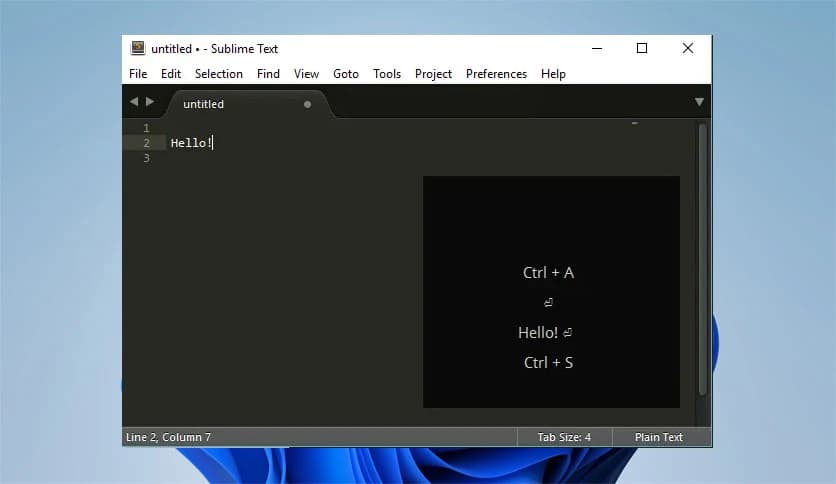
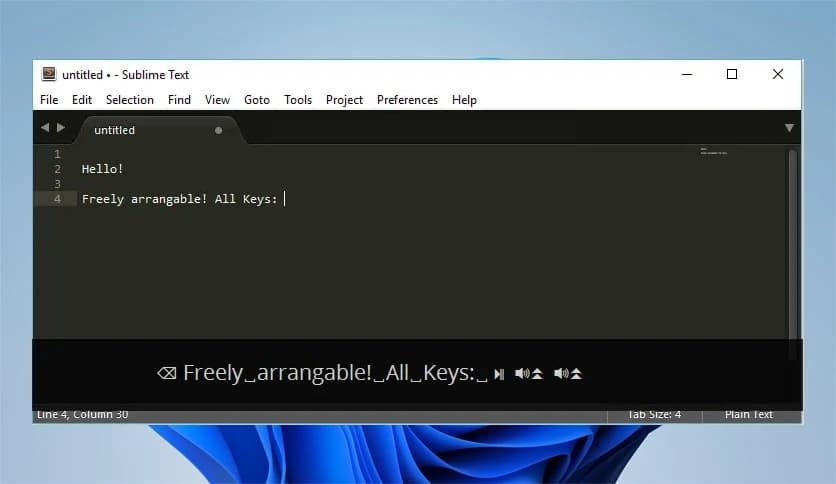
Key'n'Stroke is a small yet powerful utility that displays keyboard input and mouse clicks directly on the screen. The program places a transparent overlay window on your desktop and visually shows which keys are being pressed. This feature is especially useful for tutorials, presentations, live demonstrations, and screen recordings where viewers need to clearly see keyboard actions.
The tool runs quietly in the background, capturing keyboard input and mouse interactions in real time. Whenever a key is pressed, it instantly appears on the overlay display. The same goes for mouse clicks, which are highlighted so users can easily understand where actions are happening on the screen.
Despite its simple idea, the software offers a surprisingly flexible set of customization options. Users can change colors, fonts, icon styles, size, orientation, and even the position of the display window. Think of it as a digital spotlight that shines on every key you press.
The main purpose of the tool is to clearly display keyboard input on the screen. Whenever a key is pressed, it appears in the overlay window instantly. This helps viewers follow along with shortcuts or commands without having to guess which keys were used.
It also supports special keys such as function keys, control combinations, and volume controls. If you press a key combination like Ctrl + C or Alt + Tab, the overlay shows the combination clearly so the audience understands exactly what happened.
This feature is especially helpful for educators, YouTubers, and software trainers who want to demonstrate keyboard shortcuts step by step.
The software does not stop at keyboard inputs. It also highlights mouse clicks visually. When you click the left, right, or middle mouse button, the action appears on screen with clear indicators.
It even shows the current mouse cursor position, which can be extremely helpful during demonstrations. Viewers can see exactly where the cursor moves and where clicks happen.
Imagine explaining a software interface during a tutorial. Instead of verbally describing where to click, the overlay acts like a guide, showing each click in real time.
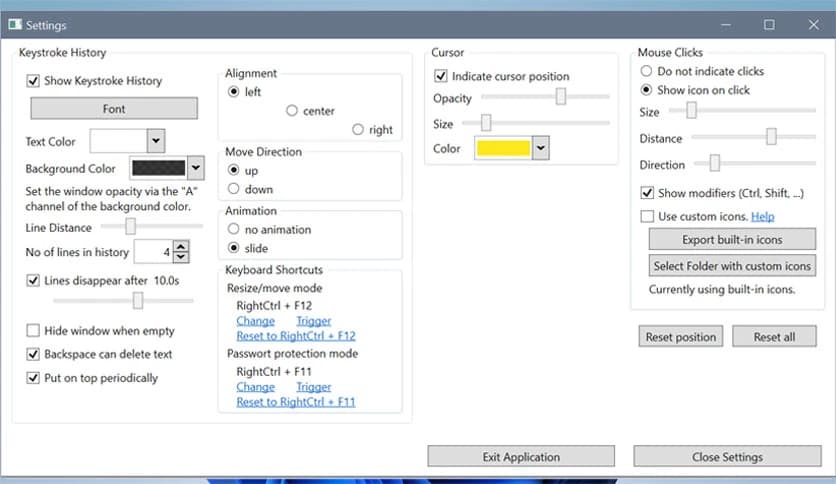
One of the software's strongest features is customization. The overlay window is fully adjustable, allowing users to tailor it to their workflow or recording style.
Users can modify many visual elements, including:
This flexibility allows the display to blend nicely with different screen layouts. Whether you want a minimal style or a bold display for teaching, the tool can adapt easily.
The Click Through feature makes the overlay window even more convenient. Normally, overlay windows might block interaction with the applications beneath them. This option solves that problem.
With this feature enabled, mouse clicks pass through the overlay window and reach the program underneath. In simple terms, the overlay becomes invisible to the mouse while still showing keystrokes.
This makes the tool feel natural and non-intrusive. It stays visible for viewers but does not interfere with normal work.
Opacity control allows users to adjust how transparent the overlay window appears. If you want the display to be subtle, you can lower the opacity. If you want the keys to stand out clearly, simply increase the visibility.
The overlay position can also be moved anywhere on the screen. Some people prefer it in the corner during recordings, while others place it near the center for training sessions.
This level of flexibility ensures the display never blocks important content while still remaining easy to see.
Another helpful feature is the key history. The program keeps track of recently pressed keys so users can review them quickly.
This is particularly useful during demonstrations. If someone misses a shortcut, they can look at the recent key list and immediately see what was pressed.
It acts like a short memory for keyboard activity, helping viewers understand complex sequences.
The software is extremely lightweight and portable. It does not require a traditional installation process. Users can simply launch it and start using it right away.
This makes it ideal for people who move between different computers or prefer portable utilities. Just run the file, and the overlay becomes active instantly.
The compact design also means it uses very few system resources. Even on older machines, it runs smoothly without slowing anything down.
Once launched, the program places a small icon in the system notification area. From there, users can quickly open settings, adjust display options, or exit the application.
This design keeps the interface simple and uncluttered. Instead of opening a large control panel, everything can be managed from the tray icon with just a few clicks.
Modern screens often use high-resolution displays. Some software struggles to scale properly on these screens, but this tool handles them well.
It supports high-DPI and multi-DPI environments, ensuring that text and icons remain sharp and readable on any display.
Whether you are using a standard monitor, a high-resolution laptop, or a multi-monitor setup, the overlay will adjust smoothly.
Key'n'Stroke is a simple yet highly useful utility for anyone who wants to display keyboard activity and mouse clicks on the screen. The tool works like a digital spotlight for your inputs, making tutorials, presentations, and demonstrations far easier to follow. With customization options, click visualization, transparency controls, and a portable design, it provides a smooth, flexible experience. If you frequently record tutorials or explain software workflows, this lightweight helper can quietly transform the clarity of your screen demonstrations.
Leave a comment
Your email address will not be published. Required fields are marked *