DesignSync Pro Download (Latest 2026) - FileCR
Free download DesignSync Pro Latest full version - Eliminate repetitive setup work for designers.
Free download DesignSync Pro Latest full version - Eliminate repetitive setup work for designers.
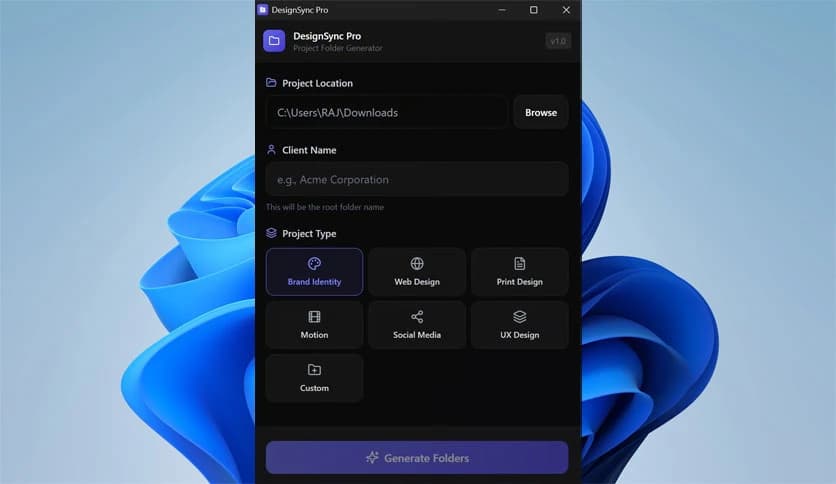
Free Download DesignSync Pro for Windows PC. It is a lightweight utility that helps designers instantly create organized project folders and remove repetitive setup work.
Setting up project folders again and again can feel like sweeping the same floor every morning. Designers often spend valuable time rebuilding identical directory structures before the real creative work even begins. This tool was created to remove that friction from everyday workflows.
The utility focuses on a single mission: automating project setup. Instead of manually creating dozens of folders, users only need to select a destination directory, enter the client name, and choose the project type they are working on. Within seconds, a complete folder hierarchy appears.
The idea is straightforward but powerful. Creative professionals may repeat the same structure dozens of times every year for branding, web design, social media campaigns, or motion graphics projects. By automating this routine task, valuable hours can be redirected toward brainstorming, designing, and building ideas that actually matter.
Built with a modern stack that includes React, TypeScript, and Rust via Tauri 2.0, the software keeps its footprint small while delivering smooth performance. It avoids the heavy overhead many desktop utilities suffer.
Design work thrives on organization. Every project includes assets, drafts, feedback files, exports, references, and final deliverables. Without structure, files quickly become scattered like puzzle pieces thrown across a table.
Creating those structures manually might only take a few minutes per project, but the cost grows over time. Imagine repeating the same process 40 to 60 times every year. Suddenly, those few minutes turn into hours lost to non-creative tasks.
The software solves this exact problem. It acts like a digital assistant that prepares the workspace before the designer even begins working. Instead of spending time organizing folders, users can jump straight into the creative process.
The workflow is designed to stay simple and intuitive. Even someone opening the utility for the first time can understand how it works within seconds.
The process usually follows four steps.
First, the user selects the destination directory for the project. This could be a main client folder, a drive dedicated to design work, or a network storage location.
Second, the client's name is entered. This automatically becomes part of the directory structure, making it easier to identify projects later.
Third, the user selects the project type. The tool includes several templates tailored for creative work, such as Brand Identity, Web Design, Print Design, Motion Graphics, Social Media, UX Design, or a custom template.
Finally, clicking generate creates the complete folder hierarchy instantly. Instead of manually building 20 to 50 folders, everything appears in seconds with standardized naming.
Once finished, the directory opens automatically in Windows Explorer, allowing the user to begin working immediately.
The built-in templates are designed specifically for design workflows. Each template follows a logical structure that mirrors how creative projects usually evolve.
Folders are arranged using sequential naming conventions such as:
This sequence keeps everything organized in a clear order. When viewed inside Windows Explorer, folders naturally appear in the correct workflow order, guiding designers through each stage of the project.
The structure also helps teams collaborate more easily. When everyone follows the same folder format, files become easier to locate and share.
Many desktop tools rely on heavy frameworks that consume unnecessary system resources. Large installations often slow down machines and take up significant storage space.
This solution takes a different approach by using Tauri instead of traditional Electron frameworks. Tauri allows developers to build desktop applications with a much smaller footprint while still delivering a modern interface.
The result is a utility that weighs only around 5.5MB. It launches quickly, runs smoothly, and integrates naturally with the Windows environment.
The technology stack behind the scenes combines several powerful tools:
React handles the user interface, ensuring everything feels responsive and modern. TypeScript adds strong typing and stability during development. Rust powers the Tauri backend, delivering speed and efficiency.
Together, these technologies create a fast, secure, and lightweight desktop experience.
Another advantage is how naturally the utility fits into the Windows workflow. After generating folders, the project directory opens automatically in File Explorer.
This small feature may seem simple, but it removes an extra step. Instead of navigating through folders manually, the workspace appears instantly.
The tool behaves like a native part of the operating system rather than an external application. It feels quick, responsive, and familiar to anyone who regularly works on Windows.
Design projects involve many repetitive tasks beyond actual design. File organization, exporting versions, managing references, and collecting assets can consume a surprising amount of time.
Automation tools help reduce these repetitive steps, allowing designers to focus on creative thinking.
This utility works like preparing a kitchen before cooking. When everything is organized and ready, the process becomes smoother and faster. Instead of searching for folders or rebuilding structures, users immediately start designing.
Over the course of a year, this simple automation can save many hours of routine work.
Another major benefit is consistency. When working with multiple clients, each project often ends up structured slightly differently. Some folders are missing, others are renamed, and confusion grows over time.
The tool eliminates that inconsistency by applying standardized structures every time a project is created.
Each client project follows the same logical pattern. This means files remain easy to locate even months or years later.
For freelancers and design teams, that level of organization can dramatically improve long-term project management.
Generic file management tools exist, but they rarely understand the real needs of designers. Many simply create blank directories without any workflow structure.
This software is different because it was built specifically for creative professionals. Every template, folder name, and sequence reflects how design projects actually unfold.
From briefing and research to concept development and final export, each stage has its own place in the folder hierarchy.
Because of this purpose-built design, the tool feels more like a workflow assistant rather than a simple folder generator.
DesignSync Pro simplifies project organization by automating the repetitive task of folder creation for design workflows. Instead of wasting valuable time rebuilding identical directory structures, designers can generate fully organized project folders in seconds. With its lightweight build, smart templates, and seamless Windows integration, the tool helps creative professionals focus on what truly matters: designing great work.
Leave a comment
Your email address will not be published. Required fields are marked *