PeerBlock Download (Latest 2026) - FileCR
Free download PeerBlock 1.2 Latest full version - Smart IP blocking tool for a safer and quieter internet.
Free download PeerBlock 1.2 Latest full version - Smart IP blocking tool for a safer and quieter internet.


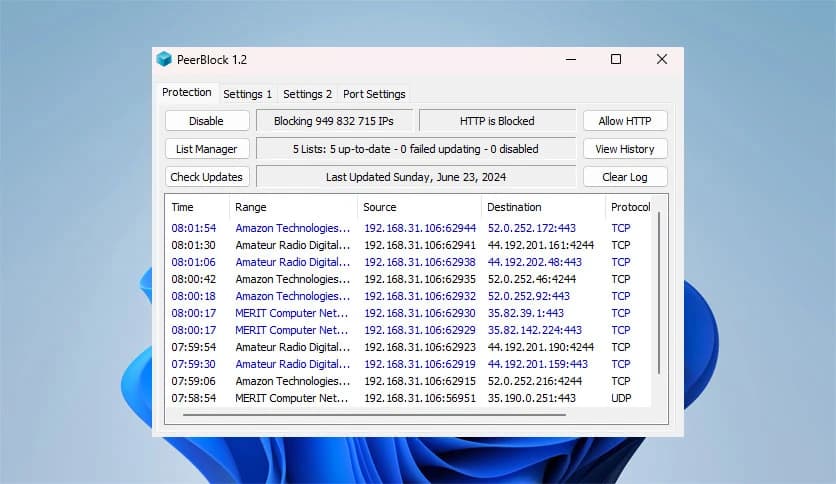
Free Download Cory Nelson PeerBlock for Windows PC. It is a lightweight privacy-focused utility that helps users take control of incoming and outgoing internet connections with simple, list-based blocking.
It is designed for people who want more control over how their system communicates online. Instead of letting every connection pass freely, it acts as a gatekeeper, checking who is trying to connect and deciding whether to allow or block the connection. Think of it as a bouncer at a private club, checking IDs before letting anyone in.
This approach makes online activity feel safer, especially for users who are concerned about tracking, unwanted monitoring, or hidden background connections. The software works quietly in the background and focuses on keeping things simple rather than overwhelming the user with complex settings.
The tool uses blocklists that contain IP ranges known for unwanted behavior. These lists can include servers linked to advertising networks, spyware activity, or systems used to monitor peer-to-peer traffic. When the software detects a connection attempt from one of these sources, it automatically blocks it.
This process happens in real time. You do not need to manually approve every connection. Once the lists are active, the tool keeps watch like a security camera that never blinks.
Privacy is the heart of this solution. Many applications connect to external servers without clearly explaining why. By filtering connections, the software helps reduce silent data sharing and unwanted communication. It creates a cleaner and more controlled online environment.
Security also benefits because suspicious systems are stopped before they can interact with your computer. While it is not a replacement for antivirus software, it adds an extra layer of protection, strengthening overall digital safety.
One of the strongest features is the use of blocklists. Users can choose from different lists depending on their needs. Some lists focus on advertising servers, others on spyware-related systems, and some on peer-to-peer monitoring networks.
You can also manually allow or block specific IP addresses. This flexibility makes the tool suitable for beginners and more advanced users alike. It is like adjusting window blinds: open them where you want light, close them where you want privacy.
The software is small and efficient. It does not consume heavy system resources or slow down everyday tasks. Once running, it stays mostly invisible, quietly doing its job without demanding attention.
Its lightweight nature makes it a good choice for both older and modern systems. You get extra protection without sacrificing performance.
The interface is clean and easy to understand. Connection alerts are shown clearly, and blocked attempts are logged so you can review them later. There is no need to dig through complicated menus or technical jargon.
Everything is laid out in a way that feels familiar, even if you are not a networking expert. It feels more like checking notifications than managing a firewall.
Many users turn to this tool to monitor peer-to-peer connections. It can help block systems that attempt to watch or log such activity. While it does not make anyone invisible online, it reduces unnecessary exposure.
This awareness gives users peace of mind, especially when sharing or downloading files over monitored networks.
Blocklists can be automatically updated to keep protection current. This means you do not have to constantly search for new lists or worry about outdated information.
Once set up, the software runs quietly in the background, much like a silent alarm system that only speaks up when something unusual happens.
PeerBlock offers a simple yet effective way to regain control over internet connections and improve online privacy. By blocking communication with known unwanted systems, it adds a quiet layer of protection that works alongside other security tools. For users who value awareness and control, it feels like locking unnecessary doors while keeping the main path clear.
Leave a comment
Your email address will not be published. Required fields are marked *