Copyparty Download (Latest 2026) - FileCR
Free download Copyparty Latest full version - Portable fast file server with smart sharing.
Free download Copyparty Latest full version - Portable fast file server with smart sharing.
Free Download Copyparty for Windows PC. It is a lightweight yet powerful portable file server that lets you share, upload, and manage files quickly with no complex setup.
It is designed to make file sharing feel effortless. It runs as a single file, so you don't need to install large packages or manage complex dependencies. You simply launch it, and your personal file server is ready to go. It supports accelerated, resumable uploads, making large-file transfers smooth and reliable. Whether you are sharing files across your home network or managing uploads for a small team, this tool keeps everything simple and efficient.
The best part is its flexibility. It combines WebDAV, FTP, TFTP, and Zeroconf support in a single, compact package. Instead of juggling multiple services, you get everything under one roof. It even includes media indexing and thumbnail generation, turning your file server into a smart content hub.
One of the software's strongest advantages is its portability. It comes as a single executable file. There is no need to install extra libraries, frameworks, or external components. You can carry it on a USB drive and run it on any compatible Windows machine.
This makes it perfect for IT professionals, students, and small businesses. Imagine having your own mini cloud server in your pocket. You plug it in, start it, and you are ready to share files within seconds. No admin-level setup. No complicated configuration.
Large file uploads can be frustrating when connections drop. The tool solves this problem through accelerated, resumable uploads. If your transfer stops halfway, it does not require you to restart from the beginning. It picks up where it left off.
This feature is especially useful for media creators, developers, and anyone handling big data files. It feels like having a safety net during transfers. You save time, reduce bandwidth waste, and avoid the stress of failed uploads.
Storage space is precious. The software includes smart deduplication, which prevents storing identical files multiple times. If the same file is uploaded again, it references the existing data rather than creating a duplicate.
Think of it like a smart librarian who recognizes the same book and returns it to its original spot instead of buying another copy. This approach saves disk space and keeps your storage clean and efficient.
Flexibility is where the tool really shines. It supports WebDAV, FTP, and TFTP protocols, providing users with multiple ways to connect and transfer files. Whether you prefer to mount it as a network drive or use an FTP client, you have options.
Zeroconf support makes device discovery easy on local networks. Devices can find the server automatically without manual IP configuration. This feels almost magical, especially for home networks or small offices where quick setup matters.
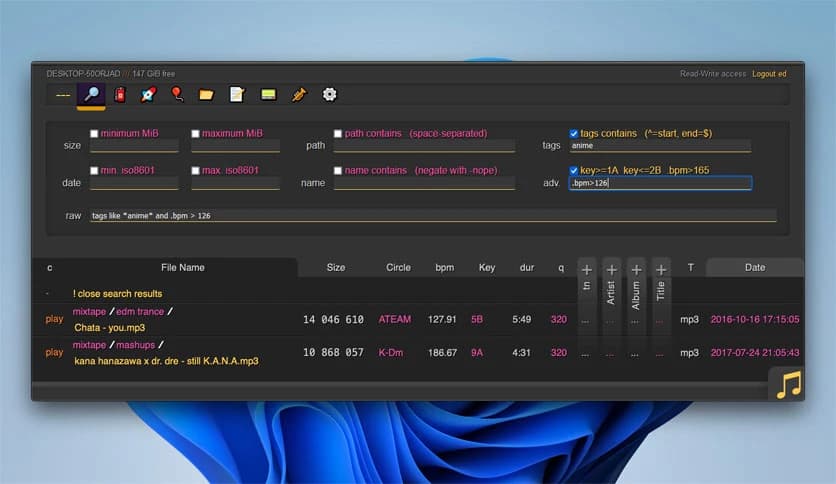
Managing a large collection of images and videos can quickly become messy. The built-in media indexer scans your content and organizes it for easier browsing. Thumbnails are generated automatically, so you can preview files without opening them.
This transforms a basic file server into a more visual and interactive solution. Instead of scrolling through file names, you see snapshots of your media. It is like upgrading from a plain text list to a smart gallery view.
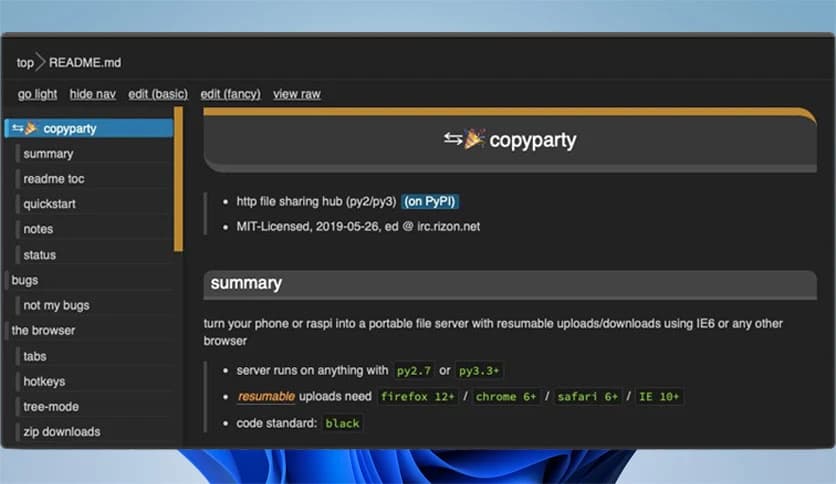
The software offers a clean web-based interface that runs directly in your browser. You do not need extra applications to manage files. You just open a browser, log in, and start uploading or downloading.
The interface is straightforward and user-friendly. Even beginners can navigate it easily. Advanced users, on the other hand, can tweak configurations to match their needs. It balances simplicity with control.
When running a file server, security is critical. The tool allows you to configure access permissions and user roles. You can decide who can upload, download, or modify files.
This makes it suitable for team collaboration. You can give limited access to guests while maintaining full control over your data. It acts as a digital gatekeeper, ensuring your files remain protected.
Despite its lightweight design, the software performs impressively. It handles multiple connections without slowing down. Because it is optimized and dependency-free, system resources remain low.
You do not need a powerful computer to run it. Even older systems can handle file-sharing tasks smoothly. This efficiency makes it an excellent solution for small servers or home setups.
This tool fits many real-world scenarios. Developers can use it to share builds and project files. Photographers can host galleries for clients. IT administrators can quickly set up temporary file transfer hubs.
It is also perfect for personal use. Instead of relying entirely on third-party cloud services, you can host your own file server. You control your data, your speed, and your privacy.
Copyparty is a compact yet powerful file server solution that combines portability, speed, and flexibility in one easy-to-use package. It removes the complexity of traditional server setups and replaces them with a smooth, accessible experience. Whether you need fast uploads, smart storage management, or multi-protocol support, it delivers reliable performance without unnecessary overhead.
Leave a comment
Your email address will not be published. Required fields are marked *