Beeble Studio Download (Latest 2026) - FileCR
Free download Beeble Studio Latest full version - AI lighting tool for cinematic video editing.
Free download Beeble Studio Latest full version - AI lighting tool for cinematic video editing.
Free Download Beeble Studio for Windows PC. It is a powerful local AI video lighting tool that lets you process and render professional visual effects directly on your own computer.
It is a modern desktop application designed for creators who want full control over their video lighting and rendering workflow. Unlike many cloud-based tools that rely on online processing and subscription credits, this solution runs entirely on local hardware. That means faster processing, improved privacy, and the freedom to create without internet limitations.
The software is especially useful for filmmakers, VFX artists, and content creators who want to experiment with realistic lighting, reflections, and surface details using AI technology. Running locally removes the delay often associated with cloud rendering services. Everything happens directly on the user's computer, resulting in a smoother, more responsive editing experience.
At the core of the platform is a powerful AI engine capable of transforming video footage into physically based rendering outputs. These outputs allow artists to adjust lighting, materials, and environment effects in ways that were previously difficult without complex production pipelines.
One of the most impressive aspects of the software is its ability to run advanced AI models directly on the user's system. Instead of sending footage to remote servers, the tool processes everything locally. This approach provides two big advantages: speed and privacy.
When working with sensitive footage or professional projects, keeping files on local machines is extremely important. Editors do not need to worry about uploading large video files or exposing confidential media to external platforms. The software keeps everything inside the workstation.
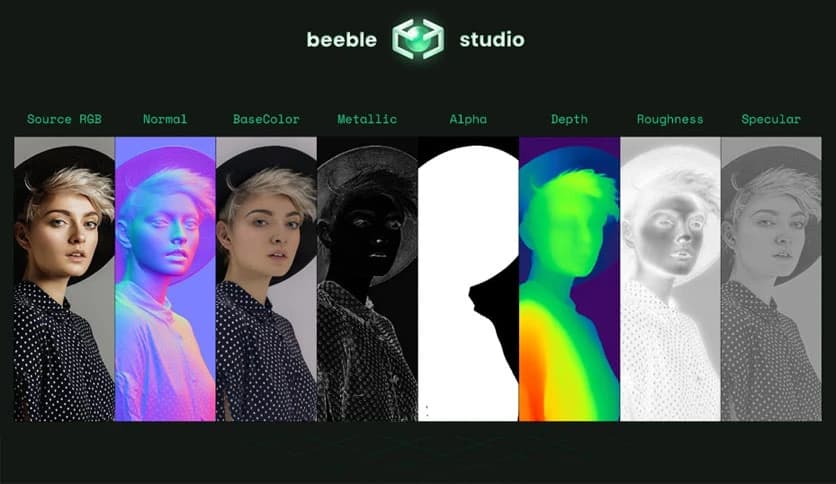
The local AI model used by the tool is known as SwitchLight 3. This model analyzes video frames and converts them into physically based rendering components. These components allow artists to simulate realistic lighting conditions, shadows, and reflections with remarkable accuracy.
Think of it like turning a flat painting into a fully lit 3D stage. Once processed, creators can place lights anywhere in the scene and adjust them just like they would in a real film studio.
The real magic happens through the video-to-PBR conversion process. PBR stands for Physically Based Rendering, a method widely used in modern visual effects and game engines. It allows digital materials and lighting to behave in ways that closely mimic the real world.
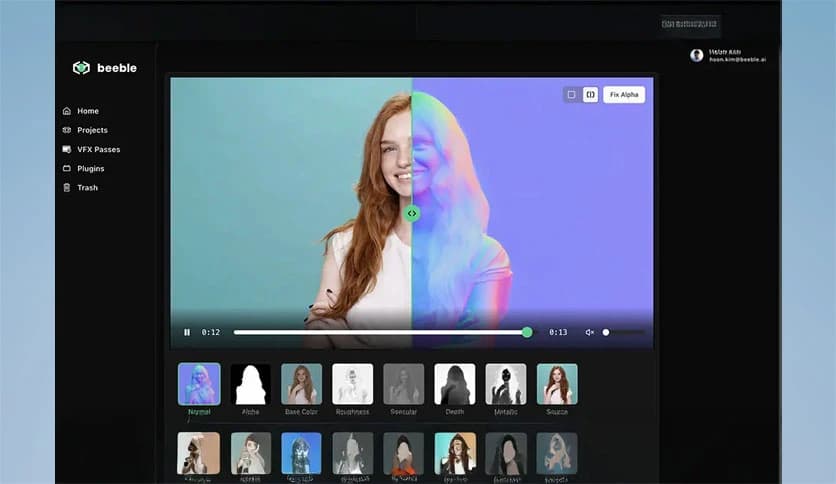
The software automatically extracts important visual information from each frame of footage. It generates multiple rendering passes that describe surface details, reflections, lighting response, and depth. These passes make it easier to adjust the look of a scene without re-shooting footage.
For example, if a video was recorded under flat lighting, creators can enhance the environment by adding dramatic lighting or subtle cinematic highlights. The process is similar to relighting a scene inside a virtual studio after filming has already finished.
This flexibility gives artists incredible creative freedom. Instead of being locked into the lighting captured during filming, they can reshape the scene's visual mood later in post-production.
Another major highlight of the tool is its support for native 4K resolution. High-resolution processing ensures that every detail in the footage remains sharp and clean during editing and rendering.
Many AI video tools reduce resolution or compress details during processing, which can cause quality loss. However, this platform preserves full resolution, making it suitable for professional film production, commercial projects, and high-quality digital content.
The software can export multi-channel 16-bit EXR files that contain all rendering passes in a single file. These passes, often called AOVs (Arbitrary Output Variables), include lighting, shading, reflections, and surface information.
For visual effects artists, this is extremely valuable. Having all rendering passes in one file enables seamless integration with industry tools such as compositing and editing software. It also simplifies the workflow because artists do not need to manage dozens of separate files.
Many creative tools today rely on credit systems or subscription limits that restrict how much content users can access. This can slow down production and create extra costs for long projects.
This platform removes that limitation completely. Once installed, users can render as many sequences as they want without worrying about credits or restrictions. The software uses the computer's own hardware resources to perform rendering tasks.
For professionals working on films, documentaries, or extended video content, this freedom is incredibly helpful. The tool can render sequences up to one hour long in a single run, making it ideal for large projects.
Creators can experiment with lighting, effects, and visual styles without constantly monitoring usage limits. It turns the workstation into a personal rendering studio that is always ready to process new ideas.
The software is built with professional workflows in mind. The interface is designed to remain simple while providing powerful capabilities under the hood. Artists can quickly load footage, apply AI processing, and generate rendering passes without a complicated setup.
This makes it accessible not only to large studios but also to independent creators and small production teams. Even content creators working from home can use the tool to produce cinematic lighting effects.
Another benefit is speed. Since everything runs locally, the rendering process often feels faster and more responsive than cloud-based alternatives. There is no waiting for uploads or server queues.
It is similar to having a compact visual effects lab inside a desktop computer. Creators can experiment freely and adjust their projects in real time.
Running locally also means creators maintain full ownership of their work. Footage never leaves the computer unless the user chooses to share it.
This is especially important for professional studios handling confidential projects or unreleased content. The software ensures that all rendering operations stay inside the local system.
Beyond privacy, local processing provides better control over hardware performance. Users can leverage powerful GPUs and processors to accelerate rendering and experimentation.
For many professionals, this balance of privacy, speed, and creative flexibility makes the platform a valuable addition to their editing toolkit.
Beeble Studio provides a powerful and flexible way to process video lighting and rendering directly on a local machine. By combining advanced AI models, native 4K support, and unlimited rendering capability, it gives creators a professional tool without the restrictions of cloud platforms. Whether someone is producing cinematic content, experimenting with visual effects, or enhancing recorded footage, the software offers the speed, privacy, and creative control needed to transform ordinary video into visually stunning scenes.

Leave a comment
Your email address will not be published. Required fields are marked *