Ace Studio Download (Latest 2026) - FileCR
Free download Ace Studio 1.0.0 Latest full version - AI-powered vocal control for creators.
Free download Ace Studio 1.0.0 Latest full version - AI-powered vocal control for creators.
Free Download Ace Studio for Windows PC. It is a powerful AI-driven music production tool built for precise vocal control, expressive performance, and professional sound design.
It is built for musicians who want control, not shortcuts. Instead of pressing a button and getting a random song, you shape every note, every breath, and every emotion yourself. It integrates AI vocals, editable instruments, voice cloning, MIDI-based control, and smart production tools into a seamless workflow. Think of it like having a virtual singer and studio team waiting for your instructions.
The software focuses on expressive performance. You can edit pitch with accuracy, adjust timing like a professional producer, and add emotional depth to every vocal phrase. It does not replace musicians. It empowers them.
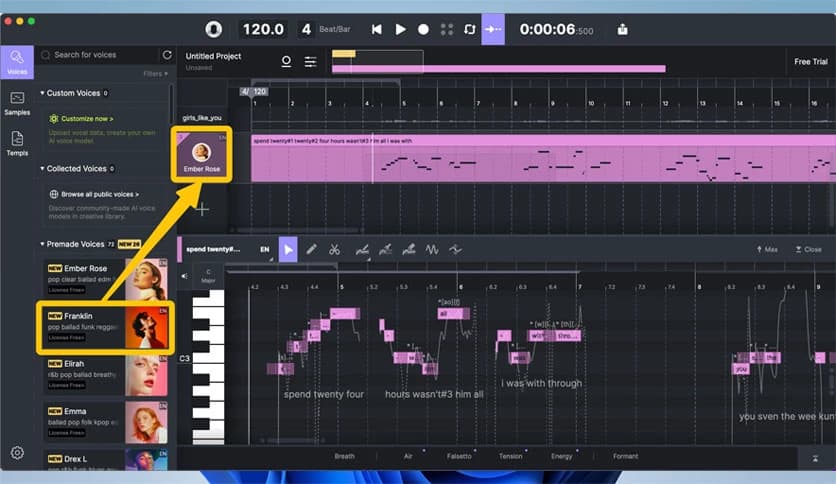
One of the tool's strongest features is its advanced AI-powered vocal engine. You are not limited to robotic voices or flat melodies. You control vibrato, pitch bends, transitions, breath strength, and tone style. It feels less like editing data and more like directing a live singer in a recording booth.
You can fine-tune each note inside a MIDI editor. If a note feels slightly sharp or emotionally weak, you fix it instantly. It provides surgical precision while keeping the sound natural and organic.
Beyond vocals, the software includes AI-powered instruments that respond to your input. These are not static loops. They react to MIDI performance and dynamic changes. When you adjust velocity or expression curves, the sound changes realistically.
This makes your production feel alive. Instead of copying and pasting samples, you shape performance details like a sculptor shaping clay. It gives depth to your tracks without complex hardware setups.
The built-in voice cloning feature lets you create custom vocal identities. You can model a voice style and use it across multiple projects. This is useful for producers who want a consistent sound without hiring multiple singers.
The cloning system focuses on realism and clarity. You can refine tone, texture, and performance style. It works like designing your own instrument, except the instrument sings.
If you are comfortable with MIDI, you will feel at home here. The software integrates tightly with MIDI editing tools, allowing you to control pitch curves, note transitions, and timing shifts directly from the piano roll.
This approach keeps things professional. Instead of guessing how AI will interpret your ideas, you guide every note. It becomes a collaboration between you and the engine, rather than an automatic generator that does everything on its own.
The integrated stem splitter allows you to separate vocals, drums, bass, and other elements from existing tracks. This is helpful for remixing, practice sessions, or rebuilding songs from scratch.
You can extract parts, rework them, and add your own AI vocals or instruments. It saves time and expands creative options. It feels like opening a locked song and exploring what is inside.
While the platform focuses on precision control, it also includes a music generator to spark ideas. You can generate melodies, harmonies, or backing tracks and then refine them manually. The generated content acts as a starting point, not a final product.
This balance keeps creativity flowing. When inspiration slows, the generator provides direction. When you are ready to polish, you take full control.
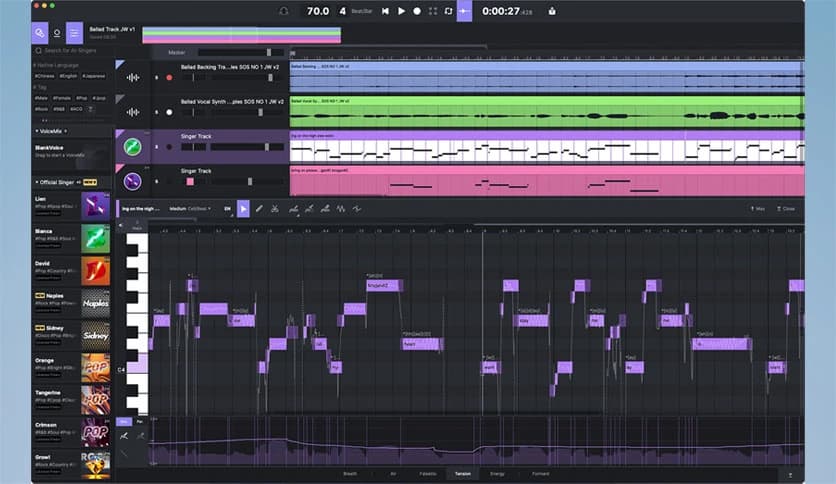
The interface is clean and production-friendly. Controls are organized logically, making it easy to move between vocal editing, MIDI adjustments, and instrument shaping. You do not waste time searching through complicated menus.
It fits naturally into a modern studio setup. Whether you are producing pop, electronic, cinematic, or experimental music, the workflow adapts to your style.
Instead of using separate tools for vocals, instruments, cloning, and splitting, everything is in a single environment. This saves time and keeps your creative process smooth.
It acts like a digital studio assistant. AI vocals, AI instruments, voice cloning, stem splitting, and idea generation work together in harmony. You stay ahead in the AI era without losing artistic control.
This software is ideal for producers, composers, songwriters, and independent artists who want advanced AI support without sacrificing creativity. If you value precision and emotional performance, it will feel like an upgrade to your workflow.
It is also helpful for content creators and music educators who need flexible vocal tools without having to hire studio singers for every project.
Ace Studio is a smart, powerful solution for musicians who demand control, realism, and creative freedom. It combines AI vocals, instruments, cloning tools, and production features into one unified platform. Instead of replacing your skills, it strengthens them. You remain the artist, and the technology becomes your instrument.
Leave a comment
Your email address will not be published. Required fields are marked *