SizeMyPics for MacOS Download (Latest 2025) - FileCR

Free download SizeMyPics for MacOS Latest full version - The Images batch processor App.
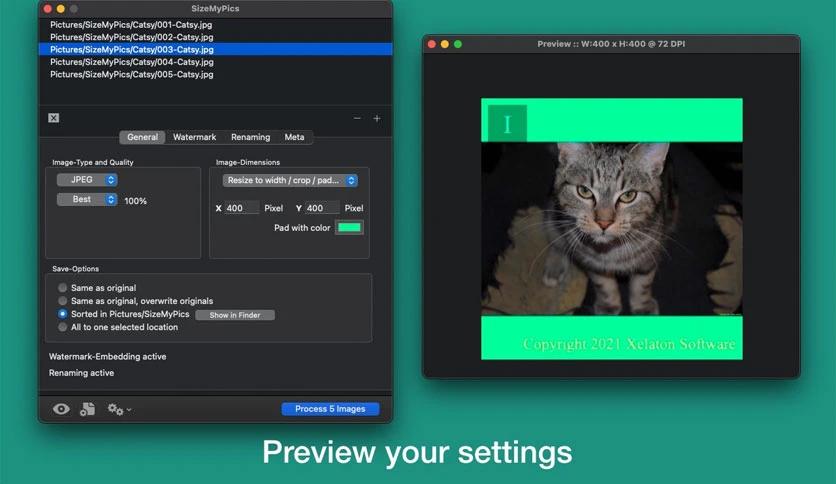
Screenshot

Free Download SizeMyPics by Xelaton Software full version standalone offline installer for MacOS. It is a powerful and intuitive image optimization tool that can help you convert many pictures to different formats and sizes in a convenient way.

Overview of SizeMyPics for macOS

It offers a quick, efficient way to resize and compress your images without sacrificing quality. Whether you're dealing with large photos from a camera or optimizing graphics for a website, the app handles it all seamlessly. It gives you complete control over image dimensions and file sizes, allowing you to meet your specific needs without unnecessary steps. The app supports a wide range of file formats, ensuring compatibility with all your images.

With its straightforward drag-and-drop functionality, you can quickly load images into the app and start resizing and compressing them. It's a one-stop solution for all your image management needs, making it a favorite for both amateurs and professionals alike. Its ability to batch-process images also saves considerable time when working with multiple files.

Key Features of SizeMyPics for macOS

  • Easy-to-Use Interface: The application features a simple drag-and-drop interface that lets users easily import images. No complex steps or complicated settings required; drop the photos, select the size or compression level, and hit "start."
  • Batch Processing: You can resize or compress multiple images at once, saving you significant time and effort. Instead of manually handling each image, choose the batch and let the app work its magic.
  • Flexible Image Resizing Options: Whether you need to resize images to a specific width or height, or to a custom percentage, the app gives you complete flexibility to adjust your photos to the dimensions you want.
  • Lossless Compression: It ensures that your images retain their original quality even after compression. This is crucial for maintaining the integrity of your photos and graphics.
  • Support for Multiple File Formats: The app supports a wide range of image formats, including JPG, PNG, GIF, and TIFF, so that you can work with almost any image type.
  • Customizable Compression Settings: You can adjust the compression settings to suit your needs, whether you're aiming for the smallest file size or the best possible quality. This level of customization is perfect for users who need specific outcomes.
  • Preset Image Sizes for Common Use Cases: If you often resize images for specific platforms (e.g., social media, websites), the app offers presets for standard image dimensions. This removes the guesswork and simplifies the process.
  • High-Speed Processing: Designed to process images quickly, especially useful when working with large batches. You can expect fast results without compromising quality.
  • File Size Preview: Before finalizing any changes, you can preview the new file sizes of your images to help ensure they meet website or email size requirements.
  • Secure and Private: All image processing is performed locally on your Mac, keeping your images private and secure. You don't need to worry about uploading your photos to external servers.

System Requirements

  • Operating System: macOS 10.13 or later
  • Processor: Intel-based or Apple Silicon
  • Memory: 4 GB RAM minimum
  • Storage: 200 MB free space for installation

FAQs

Q: What types of images can I resize with this software?
A: You can resize most common image file formats, including JPG, PNG, GIF, and TIFF.

Q: Is there a limit to how many images I can batch process?
A: No, you can batch process as many images as your system can handle without any issues.

Q: Does it support automatic resizing for social media platforms?
A: Yes, the app includes preset image sizes for common social media platforms to simplify resizing.

Q: Will my images lose quality after compression?
A: No, the app uses lossless compression to ensure that your images retain their original quality.

Q: Can I resize images to a custom size or resolution?
A: Yes, you can specify a custom width, height, or percentage for your image resizing needs.

Comments

Leave a comment

Your email address will not be published. Required fields are marked *