BetterAudio for MacOS Download (Latest 2026) - FileCR
Free download BetterAudio for MacOS Latest Offline Installer - An advanced audio device management.
Free download BetterAudio for MacOS Latest Offline Installer - An advanced audio device management.
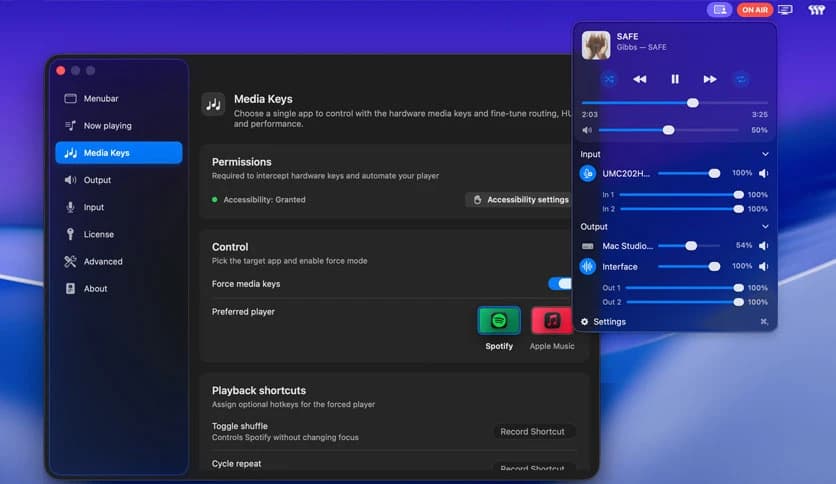
Free Download Rokartur BetterAudio, the full version, latest standalone offline installer for macOS. A menu bar app for advanced audio device management. It lets you quickly switch input/output devices, control volume, see what's currently playing, and configure global keyboard shortcuts – all from the menu bar.
Managing sound on macOS can sometimes feel like juggling too many knobs at once. This project is a lightweight, practical helper that puts audio control exactly where you need it. It focuses on speed, clarity, and convenience, allowing you to stay focused on your work or entertainment without digging through menus.
This macOS-focused audio utility simplifies managing audio devices and playback. It serves as a central hub where you can view what is playing, adjust sound levels, and switch audio sources without disrupting your workflow. Think of it as a dashboard that neatly organizes all your sound controls.
macOS 14.6 or later
Q: Is this tool suitable for beginners?
A: Yes, the interface is intuitive and straightforward, making it easy for anyone to use.
Q: Does it slow down the system?
A: No, it is lightweight and designed to run efficiently on macOS.
Q: Can I switch microphones quickly?
A: Yes, audio input switching is fast and straightforward.
Q: Is it safe to use daily?
A: Absolutely, it is stable and built for everyday use.
Q: Do I need technical knowledge to use it?
A: Not at all, it works right out of the box with minimal setup.
Q: Can it help during online meetings?
A: Yes, quick audio control makes meetings smoother and stress-free.
Leave a comment
Your email address will not be published. Required fields are marked *