Net Blocker: Block Data Access Mod APK Free Download - FileCR
Free download Net Blocker: Block Data Access 2.0.22 Pro / Premium MOD Version Unlocked Ad-Free APK for Android. Block internet access for specific applications.
Free download Net Blocker: Block Data Access 2.0.22 Pro / Premium MOD Version Unlocked Ad-Free APK for Android. Block internet access for specific applications.

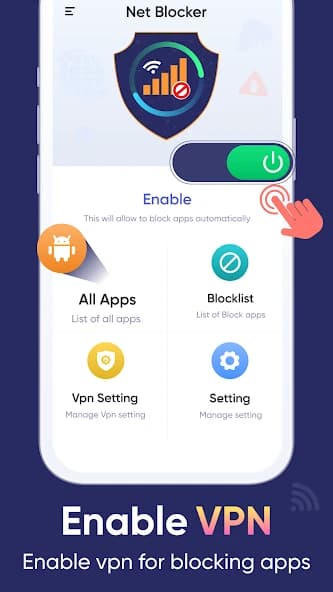


Free Download Net Blocker: Block Data Access APK for Android Phones and Tablets. This app helps users block internet access for specific applications without turning off Wi-Fi or mobile data for the entire device.
It is an innovative and valuable tool for managing internet usage on your Android device. Instead of disabling Wi-Fi for your entire phone, this app lets you choose which apps can access the internet. This helps save data, improves privacy, and even enhances battery life.
The app features a simple, user-friendly interface with four main sections: All Apps, Blocklist, VPN Settings, and App Settings. Each section is easy to navigate and helps users quickly manage network access. No technical knowledge is needed, making the app suitable for beginners and advanced users alike.
Net Blocker: Block Data Access is a powerful yet simple tool that gives you complete control over which apps can use the internet on your device. Whether your goal is to save data, improve privacy, or reduce battery usage, this app provides all the features you need in one place. With a clean design, easy navigation, and reliable performance, it is a perfect choice for anyone looking to manage internet access on their Android phone.
Q: What does the app do?
A: It allows you to block Wi-Fi and mobile data for specific apps on your device.
Q: Do I need root access to use this app?
A: No, the app works without root access.
Q: Can I block the internet for all apps at once?
A: Yes, the settings menu includes options to block Wi-Fi or mobile data for all apps.
Q: Is my data safe while using this app?
A: Yes, the app does not collect or share personal information. It only uses required permissions to help manage internet access.
Q: How do I unblock an app?
A: Go to the Blocklist section, select the app, and re-enable Wi-Fi or mobile data for it.
Leave a comment
Your email address will not be published. Required fields are marked *